Lecture 2: Exploratory Data Analysis (EDA)

Author

Dr. Logan Kelly

Published

September 10, 2024

Introduction to Exploratory Data Analysis (EDA)

  • Objective:
    • The goal of this lecture is to explore the relationship between Energy Efficiency (MPG) and Horsepower (HP) by performing exploratory data analysis (EDA).
    • EDA helps us visualize the data and identify potential trends, patterns, or outliers before conducting any formal analysis.
  • Why EDA is Important:
    • EDA provides an initial understanding of the data and its characteristics.
    • It allows us to detect anomalies, visualize relationships, and understand the structure of the dataset.
    • In this case, EDA will help us assess whether there is a linear relationship between Energy Efficiency (MPG) and Horsepower (HP), which will inform the next steps in our analysis.
  • Key Learning Outcomes:
    • By the end of this lecture, students will be able to:
      • Generate visualizations of data using scatter plots.
      • Detect potential outliers using Tukey’s method.
      • Identify potential relationships between variables.

Visualizing the Relationship Between Energy Efficiency (MPG) and Horsepower

Scatter Plot for Initial Visualization

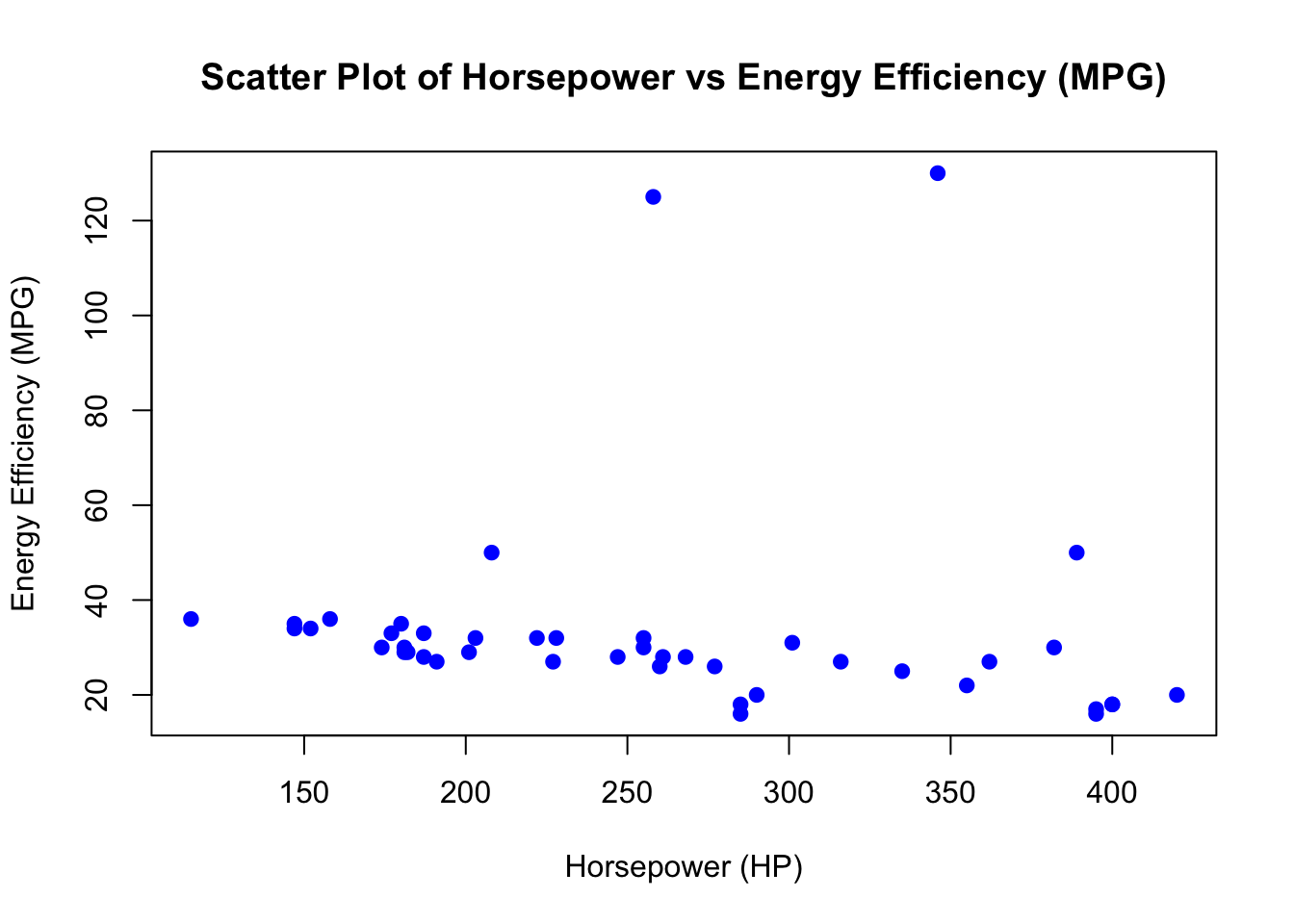
  • Explanation: Scatter plots are one of the most effective ways to visualize the relationship between two numerical variables. By plotting Horsepower (HP) on the x-axis and Energy Efficiency (MPG) on the y-axis, we can begin to assess whether there is a relationship between these variables.
# Scatter plot of Horsepower vs Energy Efficiency (MPG)
plot(car_data$Horsepower, car_data$`Energy Efficiency (MPG)`,
     main = "Scatter Plot of Horsepower vs Energy Efficiency (MPG)",
     xlab = "Horsepower (HP)",
     ylab = "Energy Efficiency (MPG)",
     pch = 19, col = "blue")
  • Explanation:
    • plot(): This function creates a scatter plot with Horsepower (HP) on the x-axis and Energy Efficiency (MPG) on the y-axis.
    • main: Sets the title of the plot.
    • xlab and ylab: Set the labels for the x-axis and y-axis, respectively.
    • pch = 19: Specifies that the points should be solid circles.
    • col = "blue": Sets the color of the points to blue.

Identifying Potential Outliers Using Tukey’s Method

  • Explanation: Tukey’s method is a commonly used technique for identifying outliers. It defines outliers as points that lie outside 1.5 times the interquartile range (IQR) from the first or third quartiles. Using this method, we can detect unusually high or low values in Energy Efficiency (MPG).

  • Steps:

    1. Calculate the first quartile (Q1) and third quartile (Q3) of Energy Efficiency (MPG).
    2. Compute the IQR (Interquartile Range), which is the difference between Q3 and Q1.
    3. Define outliers as points that are greater than Q3 + 1.5 × IQR or less than Q1 - 1.5 × IQR.
# Calculate quartiles and IQR for Energy Efficiency (MPG)
Q1 <- quantile(car_data$`Energy Efficiency (MPG)`, 0.25)
Q3 <- quantile(car_data$`Energy Efficiency (MPG)`, 0.75)
IQR <- Q3 - Q1

# Define upper and lower bounds for outliers
lower_bound <- Q1 - 1.5 * IQR
upper_bound <- Q3 + 1.5 * IQR

# Identify outliers
outliers_indices <- car_data$`Energy Efficiency (MPG)` < lower_bound | 
                    car_data$`Energy Efficiency (MPG)` > upper_bound
  • Explanation:
    • quantile(): Calculates the first (Q1) and third (Q3) quartiles for Energy Efficiency (MPG).
    • IQR <- Q3 - Q1: Computes the interquartile range (IQR).
    • lower_bound: Defines the lower threshold for outliers as Q1 - 1.5 × IQR.
    • upper_bound: Defines the upper threshold for outliers as Q3 + 1.5 × IQR.
    • outliers_indices: Identifies rows where Energy Efficiency (MPG) values are either lower than the lower bound or higher than the upper bound.

Highlighting Outliers in the Plot

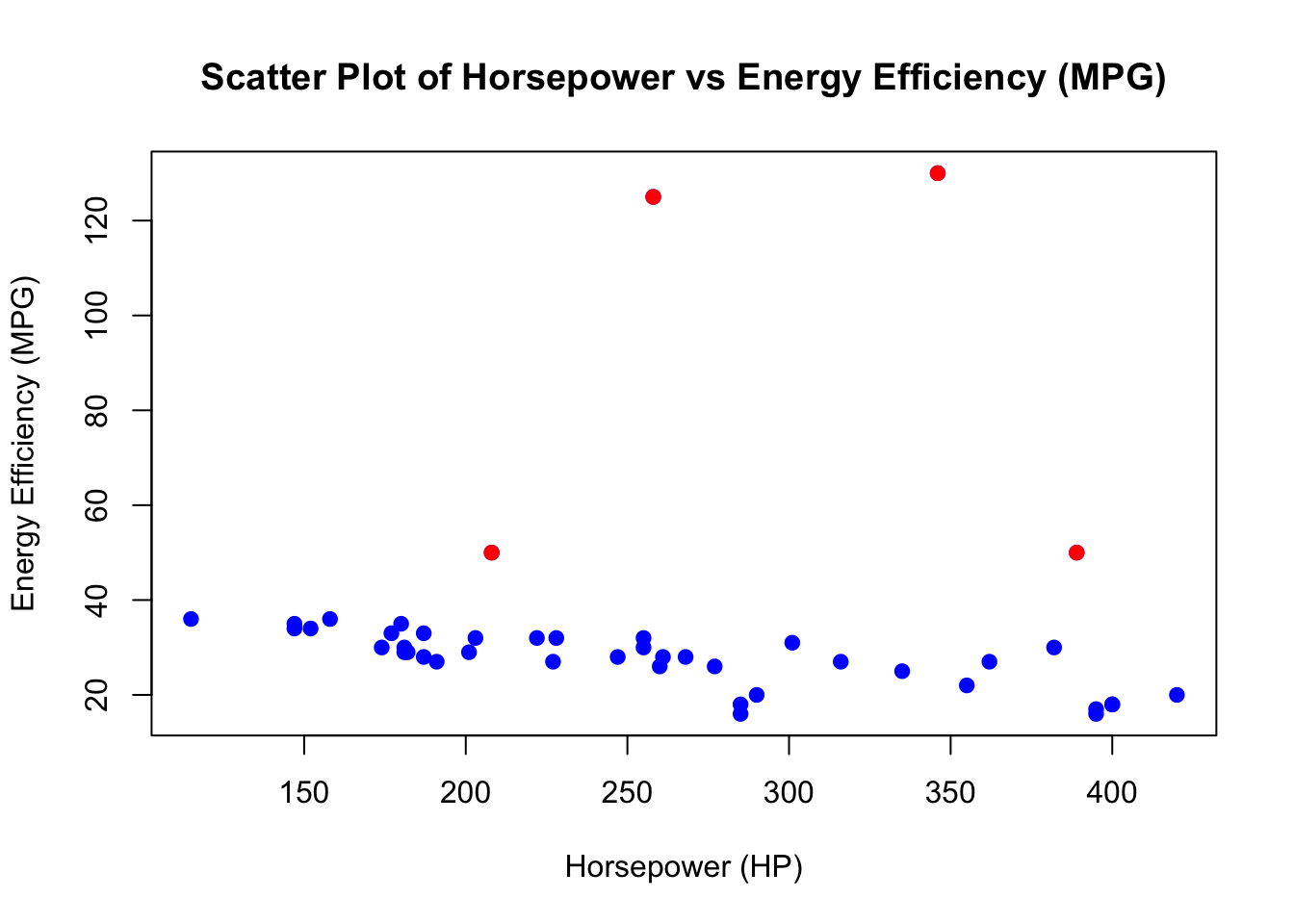
  • Explanation: After identifying the outliers using Tukey’s method, we can highlight them in the scatter plot.
# Scatter plot of Horsepower vs Energy Efficiency (MPG)
plot(car_data$Horsepower, car_data$`Energy Efficiency (MPG)`,
     main = "Scatter Plot of Horsepower vs Energy Efficiency (MPG)",
     xlab = "Horsepower (HP)",
     ylab = "Energy Efficiency (MPG)",
     pch = 19, col = "blue")
# Highlight outliers in the scatter plot
points(car_data$Horsepower[outliers_indices], 
       car_data$`Energy Efficiency (MPG)`[outliers_indices], 
       col = "red", pch = 19)

  • Explanation:
    • points(): Adds red points to the scatter plot to highlight the identified outliers based on Tukey’s method.
  • Discussion:
    • Outliers might represent unique or unusual vehicles (e.g., electric or hybrid cars that have significantly higher energy efficiency).
    • It’s important to assess whether these outliers should be excluded or further investigated in the next steps of the analysis.

Removing Outliers

Removing Outliers from the Dataset

  • Explanation: Once outliers are identified, we may choose to remove them to improve the accuracy of the model. This step will demonstrate how to exclude the previously identified outliers from the dataset.
# Remove the identified outliers from the dataset
car_data_clean <- car_data[!outliers_indices, ]

# Save the cleaned dataset as an RData file
save(car_data_clean, file = "car_data_clean.RData")
  • Explanation:
    • car_data_clean <- car_data[!outliers_indices, ]: This line removes the rows of data that correspond to the outliers. The ! operator negates the condition, meaning we are keeping all rows that are not outliers.

Discussion of Handling Outliers

  • Explanation: Outliers can have a significant impact on statistical analyses, including linear regression models. Deciding how to handle outliers depends on the context of the data and the goals of the analysis. Below are some common strategies for dealing with outliers:
  1. Remove Outliers:
    • This approach is appropriate when outliers are clearly errors or irrelevant to the analysis. For example, data entry errors or vehicles with characteristics outside the typical range might be removed to improve the model’s accuracy.
    • Pros: Can result in a better model fit and more accurate predictions.
    • Cons: You may lose valuable information if the outliers represent rare but important cases (e.g., luxury or electric vehicles with unique characteristics).
  2. Transform Data:
    • Instead of removing outliers, you can apply a transformation (e.g., log or square root) to the data, which can reduce the influence of extreme values.
    • Pros: Keeps all data points while reducing the influence of outliers.
    • Cons: Transformed models can be harder to interpret, and transformation may not always solve the issue.
  3. Winsorization:
    • Involves replacing outliers with the nearest value that is not an outlier (e.g., capping extreme values at the 1st and 99th percentiles).
    • Pros: Mitigates the effect of outliers without entirely removing data points.
    • Cons: Arbitrary selection of thresholds can distort the data.
  4. Keep the Outliers:
    • In some cases, it is better to keep outliers, especially if they represent important but rare cases (e.g., electric vehicles with high energy efficiency).
    • Pros: Keeps the full data and reflects the true diversity in the data.
    • Cons: Outliers may skew the results, leading to less accurate predictions for the general population.
  • Considerations for This Case Study:
    • In the context of vehicle data, outliers might represent vehicles with very high energy efficiency (e.g., electric cars) or vehicles priced much higher than the typical car (e.g., luxury brands). These vehicles may be important depending on the objective of the analysis.
    • If you are analyzing typical cars, it may make sense to remove these outliers. However, if you’re interested in the entire car market, including electric and luxury vehicles, you might want to retain them.

Re-plotting the Cleaned Data

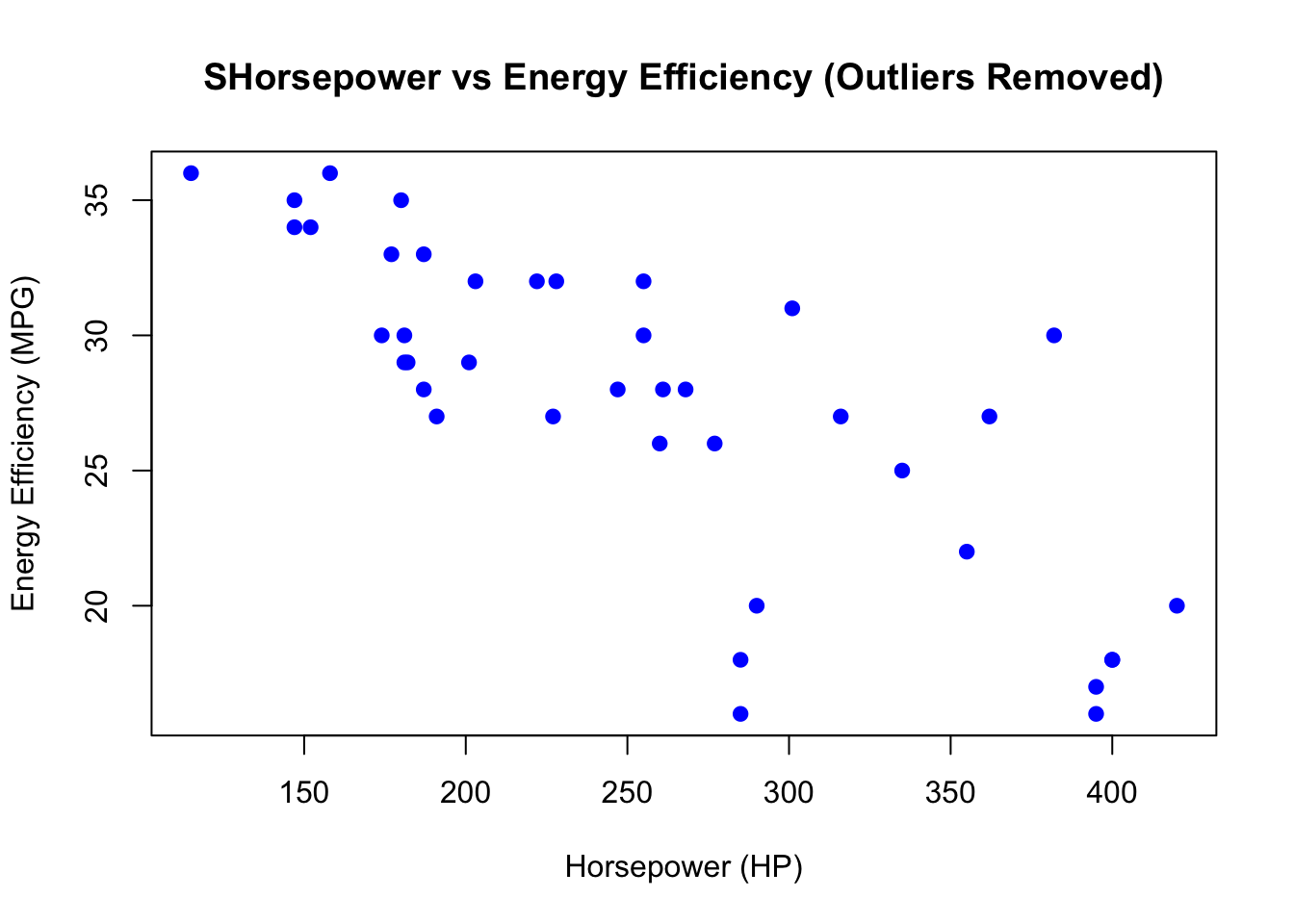
  • Explanation: After removing the outliers, it’s useful to create a new scatter plot to visualize the data without the outliers and to see if the relationship between Horsepower (HP) and Energy Efficiency (MPG) has changed.
# Scatter plot of Horsepower vs Energy Efficiency (MPG) without outliers
plot(car_data_clean$Horsepower, car_data_clean$`Energy Efficiency (MPG)`,
     main = "SHorsepower vs Energy Efficiency (Outliers Removed)",
     xlab = "Horsepower (HP)",
     ylab = "Energy Efficiency (MPG)",
     pch = 19, col = "blue")

  • Explanation:
    • This scatter plot is similar to the original plot, but now it visualizes the relationship between Horsepower (HP) and Energy Efficiency (MPG) after outliers have been removed.
  • Discussion:
    • Does the relationship between the variables look clearer without the outliers?
    • Removing outliers can sometimes make the relationship between the variables more apparent and result in better-fitting models.

Evaluating Linearity

Assessing the Scatter Plot for Linearity

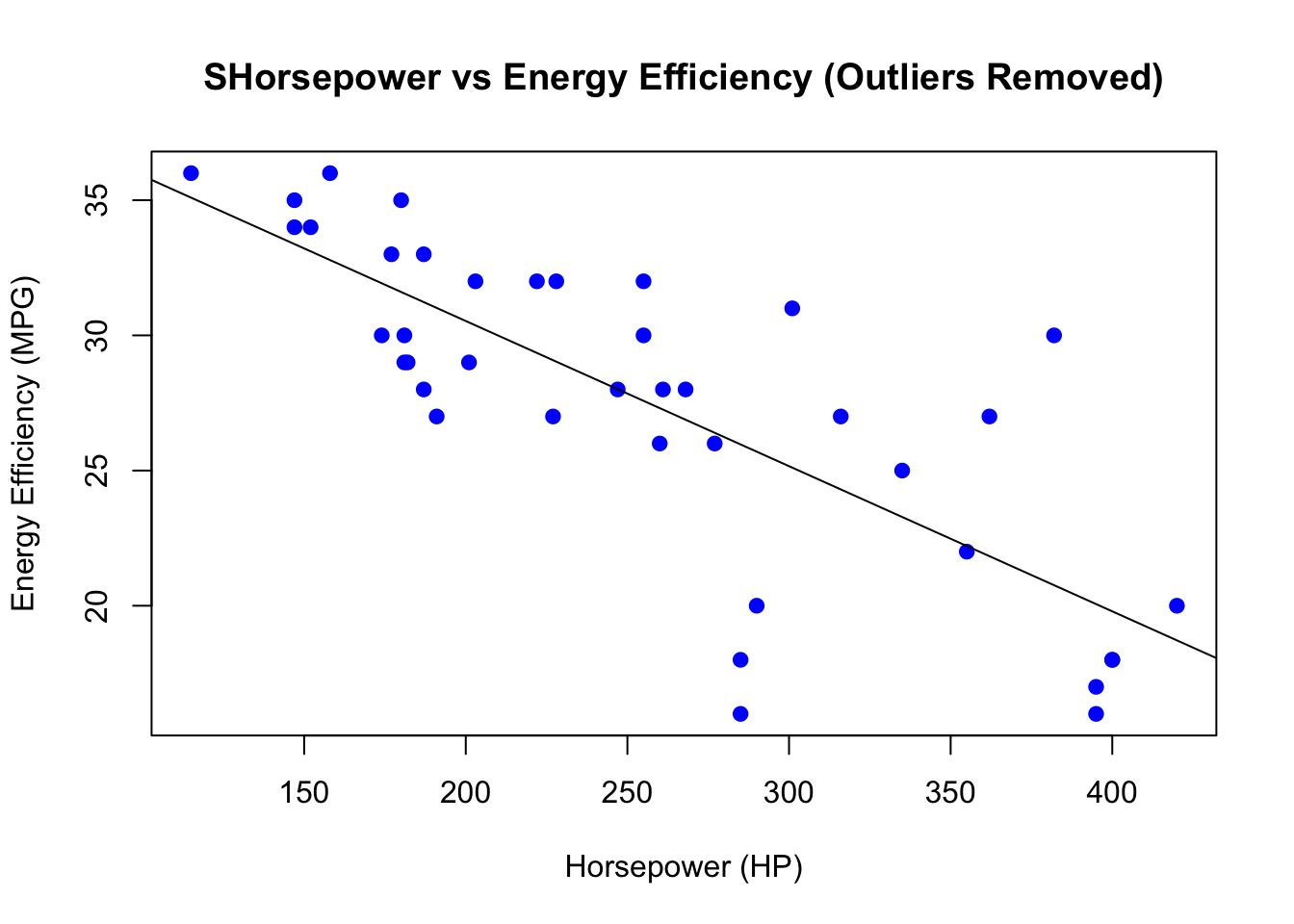
  • Explanation: One of the key assumptions in linear regression is that there is a linear relationship between the predictor and the response variable.
    • By examining the scatter plot, we can make an initial assessment of whether the relationship between Horsepower (HP) and Energy Efficiency (MPG) appears to be linear.
  • Questions to consider:
    • Does the scatter plot suggest a straight-line relationship between Horsepower (HP) and Energy Efficiency (MPG)?
    • If the relationship appears to be non-linear (e.g., curved or clustered), we may need to consider alternative models or transformations in future lectures.

Placeholder for Further Analysis

  • Explanation: While we are only performing visual assessments at this stage, we will confirm the linearity assumption in future steps using formal regression analysis and diagnostic checks.

Conclusion and Next Steps

  • Summary:
    • In this lecture, we explored the relationship between Horsepower (HP) and Energy Efficiency (MPG) using scatter plots.
    • We identified and removed potential outliers using Tukey’s method, discussed strategies for handling outliers, and re-assessed the linearity of the relationship.
  • Next Steps:
    • In the next lecture, we will proceed to fit a simple linear regression model to quantify the relationship between Horsepower (HP) and Energy Efficiency (MPG).
    • We will also begin evaluating the goodness of fit of the model and performing diagnostic checks.

Assignment for Students:

  • Create a scatter plot of Horsepower (HP) vs. Energy Efficiency (MPG) using the provided dataset.
  • Use Tukey’s method to identify and remove any potential outliers, then re-plot the data.
  • Write a brief summary discussing whether you believe there is a linear relationship between the two variables after outliers have been removed.